Navigation: Power CD+G Burner Help Index
How to create a compilation of songs from various discs
How to create a compilation of songs from various CD+G discs
1.
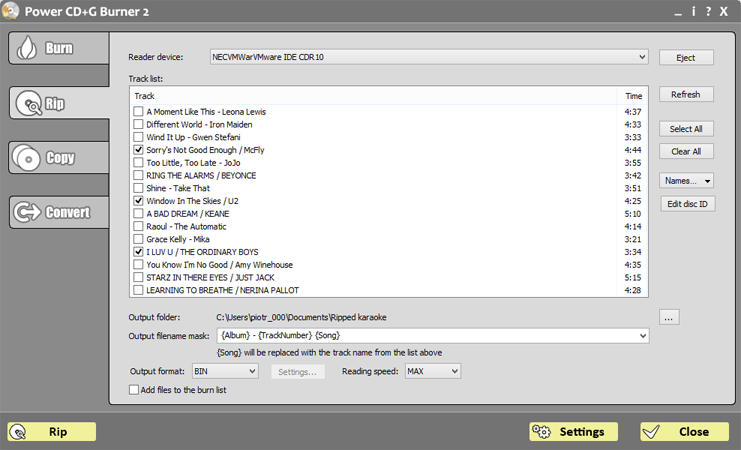
Select Rip tab
2.
Select source drive in Reader device combo
3.
Make sure that Add files to the burn list option is checked
4.
Select BIN as Output format.
5.
Insert first CD+G disc and click Refresh button. Track list should appear.
6.
Choose tracks you would like to put on your compilation disc by selecting them on the list
7.
Click Rip
8.
When rip process is finished you will be taken to Burn tab. If you would like to add more songs repeat steps from 1 to 7 for next discs
9.
Now you are ready to burn your compilation disc.
10.
Select burner device (it may be the same as reader drive)
11.
If you do not want to use the files you have ripped in steps 1-7 after compilation is done, select Delete files after burning
12.
Insert blank CD into burner drive
13.
Click Burn
14.
If burning phase is causing problems please see Troubleshooting.