
Version 2.1.1.39 has additional title image options -- you may separately choose background image, also you may stretch the title image to full width disabling the aspect ratio.
It is also possible to disable secret code (in General settings).
I was unable to reproduce the problem with zeros at the start of the code -- can you please confirm that the current version still does it?
Ver 2.0.70
Moderators: admin, Piotr, adam
Piotr,
When a singer puts in a code with a leading 0 on my systems it show in their properties as a 3 number code but seems to work ok here..i.e. 0234 shows as 234
with .39 i am still experiencing:
1. remote queue column widths randomly resetting from where I set them
2. losing spaces/characters after the apostrophe in my announce screen header (in edit singer announce screen dialog in settings) during startup.shutdown as well as when I click ok when making adjustments to the individual singers properties (if I click cancel everything stays the same)
When a singer puts in a code with a leading 0 on my systems it show in their properties as a 3 number code but seems to work ok here..i.e. 0234 shows as 234
with .39 i am still experiencing:
1. remote queue column widths randomly resetting from where I set them
2. losing spaces/characters after the apostrophe in my announce screen header (in edit singer announce screen dialog in settings) during startup.shutdown as well as when I click ok when making adjustments to the individual singers properties (if I click cancel everything stays the same)
-
Paradigm Karaoke

- Senior Member
- Posts: 1161
- Joined: Sun Aug 29, 2010 8:13 pm
- Location: Phoenix AZ
- Contact:
-
AbsoluteDJ
- Senior Member
- Posts: 90
- Joined: Thu Nov 13, 2014 4:23 pm
Wifi Access Point / Travel Router
Here's my idea. Maybe someone is doing this already?
I want to setup an AP/Router that will hook up to the existing wifi in the bar or restaurant. It will be able to rebroadcast the internet to the singer/users phones just as if they were on the bars wifi. This will allow them to continue using their phones normally.
This AP will have an SSID name of "Your Karaoke Show". Possibly a welcome page or captive portal that says welcome to "Your Karaoke Show"
The KJ Host computer will also hook up to this AP/Router but must be fire-walled from the internet to prevent Windows Updates and any other internet traffic from occurring. I don't care to use the Youtube functionality of Siglos.
The KJ Host computer will use a static IP address & Port which will be consistent for the patrons/singers.
I know it's a tall order, but can it be done?
Thanks!
AbsoluteDJ/John
I want to setup an AP/Router that will hook up to the existing wifi in the bar or restaurant. It will be able to rebroadcast the internet to the singer/users phones just as if they were on the bars wifi. This will allow them to continue using their phones normally.
This AP will have an SSID name of "Your Karaoke Show". Possibly a welcome page or captive portal that says welcome to "Your Karaoke Show"
The KJ Host computer will also hook up to this AP/Router but must be fire-walled from the internet to prevent Windows Updates and any other internet traffic from occurring. I don't care to use the Youtube functionality of Siglos.
The KJ Host computer will use a static IP address & Port which will be consistent for the patrons/singers.
I know it's a tall order, but can it be done?
Thanks!
AbsoluteDJ/John
Re: Wifi Access Point / Travel Router
AbsoluteDJ wrote:Here's my idea. Maybe someone is doing this already?
I want to setup an AP/Router that will hook up to the existing wifi in the bar or restaurant. It will be able to rebroadcast the internet to the singer/users phones just as if they were on the bars wifi. This will allow them to continue using their phones normally.
This AP will have an SSID name of "Your Karaoke Show". Possibly a welcome page or captive portal that says welcome to "Your Karaoke Show"
The KJ Host computer will also hook up to this AP/Router but must be fire-walled from the internet to prevent Windows Updates and any other internet traffic from occurring. I don't care to use the Youtube functionality of Siglos.
The KJ Host computer will use a static IP address & Port which will be consistent for the patrons/singers.
I know it's a tall order, but can it be done?
Thanks!
AbsoluteDJ/John
Yes it can be done, but you are opening yourself up to a world of hurt exposing yourself AND your patrons to the internet. .... firewalls are not the be all and end all, theres many other things that come in to play when you want to expose something onto the internet .... also as you essentially want to 'piggyback'off the venues internet feed, rather than using your own, you are also potentially opening up their network to risks.
It CAN be done, and if you were going to do it, I would suggest getting a router that supports a linux based OS, such as OpenWRT, Tomato, Gargoyle, or DD-WRT ... that way you can utilize both IPTables for the firewall and routing component, as well as creating and bridging a guest network. You are also able to configure client isolation, which prevents clients on that network from seeing each other.
However it will not be an easy thing at all.
If I was the venue, I would be giving you a resounding no, I wouldn't be opening up my network to anybody.
You would be much better off supplying your own internet feed via 4G into your router, and then either setting up a guest network, that only allows patrons to access specific things, or setting up something like DyDNS to route a web address to your specific kiosk function, and users wont need to connect to your guest network at all.
-
Paradigm Karaoke
- Senior Member
- Posts: 1161
- Joined: Sun Aug 29, 2010 8:13 pm
- Location: Phoenix AZ
- Contact:
Piotr I had some glitches with.40 at last nights show.
1. The column width in the remote queue are still resetting themselves.
2. When a guest browses by artist and they click an artist with 'n' in the band's name (i.e. Guns 'N' Roses) that has multiple songs they're unable to click on a song to request it. But they can if they browse by song and search for the same band
**edit** on further tinkering #2 seems to affect any artist with an apostrophe in their name and having multiple songs when browsing by artist but not affected when searching by song
1. The column width in the remote queue are still resetting themselves.
2. When a guest browses by artist and they click an artist with 'n' in the band's name (i.e. Guns 'N' Roses) that has multiple songs they're unable to click on a song to request it. But they can if they browse by song and search for the same band
**edit** on further tinkering #2 seems to affect any artist with an apostrophe in their name and having multiple songs when browsing by artist but not affected when searching by song
Last edited by hawke68 on Sat Dec 22, 2018 8:35 pm, edited 1 time in total.
One question for all of you out there. All this time I've been using my laptop that has Windows 10 on it, but I recently tried the latest version of KP on my Win XP laptop and noticed that the remote kiosk does not work. I noticed on the Remote Queue settings in the local server network that the IP address on the Win 10 laptop displays 192.168.1.6 (WI-FI). However, on the XP laptop it shows 192.168.1.9 (). I think the WI-FI in parenthesis is the problem, but I can't get the (WI-FI) status on the XP laptop. Just curious, anyone using an XP laptop and experiencing the same problem?
-
AbsoluteDJ
- Senior Member
- Posts: 90
- Joined: Thu Nov 13, 2014 4:23 pm
Re: Wifi Access Point / Travel Router
I like the DynDns idea, that would be slick.
Here is my dilemma, my DJ computers have never been on the internet. I've always kept them running lean and without any AV software. The rules for my employee's are that nobody plugs anything in. All updates both software and music are done by me and therefore everything is in a quarantine. This policy has worked out well. So is there a software firewall that would prevent all Windows 10 updates and internet traffic except for let's say the inbound requests from the singers phones? Is this possible?
Thanks for your reply!
Here is my dilemma, my DJ computers have never been on the internet. I've always kept them running lean and without any AV software. The rules for my employee's are that nobody plugs anything in. All updates both software and music are done by me and therefore everything is in a quarantine. This policy has worked out well. So is there a software firewall that would prevent all Windows 10 updates and internet traffic except for let's say the inbound requests from the singers phones? Is this possible?
Thanks for your reply!
blade316 wrote:AbsoluteDJ wrote:Here's my idea. Maybe someone is doing this already?
I want to setup an AP/Router that will hook up to the existing wifi in the bar or restaurant. It will be able to rebroadcast the internet to the singer/users phones just as if they were on the bars wifi. This will allow them to continue using their phones normally.
This AP will have an SSID name of "Your Karaoke Show". Possibly a welcome page or captive portal that says welcome to "Your Karaoke Show"
The KJ Host computer will also hook up to this AP/Router but must be fire-walled from the internet to prevent Windows Updates and any other internet traffic from occurring. I don't care to use the Youtube functionality of Siglos.
The KJ Host computer will use a static IP address & Port which will be consistent for the patrons/singers.
I know it's a tall order, but can it be done?
Thanks!
AbsoluteDJ/John
Yes it can be done, but you are opening yourself up to a world of hurt exposing yourself AND your patrons to the internet. .... firewalls are not the be all and end all, theres many other things that come in to play when you want to expose something onto the internet .... also as you essentially want to 'piggyback'off the venues internet feed, rather than using your own, you are also potentially opening up their network to risks.
It CAN be done, and if you were going to do it, I would suggest getting a router that supports a linux based OS, such as OpenWRT, Tomato, Gargoyle, or DD-WRT ... that way you can utilize both IPTables for the firewall and routing component, as well as creating and bridging a guest network. You are also able to configure client isolation, which prevents clients on that network from seeing each other.
However it will not be an easy thing at all.
If I was the venue, I would be giving you a resounding no, I wouldn't be opening up my network to anybody.
You would be much better off supplying your own internet feed via 4G into your router, and then either setting up a guest network, that only allows patrons to access specific things, or setting up something like DyDNS to route a web address to your specific kiosk function, and users wont need to connect to your guest network at all.
-
Paradigm Karaoke
- Senior Member
- Posts: 1161
- Joined: Sun Aug 29, 2010 8:13 pm
- Location: Phoenix AZ
- Contact:
i either have windows 10 or on my kiosks i use linux.
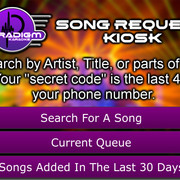
Piotr, only thing i still see is the buttons on the kiosk still only click when in the horizontal plane of the text. parts of the button above and below that plane do not work.
but the rest looks awesome!!!
here is what i ended up using for my kiosk screens
Piotr, only thing i still see is the buttons on the kiosk still only click when in the horizontal plane of the text. parts of the button above and below that plane do not work.
but the rest looks awesome!!!
here is what i ended up using for my kiosk screens
-
Paradigm Karaoke
- Senior Member
- Posts: 1161
- Joined: Sun Aug 29, 2010 8:13 pm
- Location: Phoenix AZ
- Contact:
Who is online
Users browsing this forum: No registered users and 1 guest