Siglos Karaoke Player/Recorder 2
Karaoke has never looked that good!
Our karaoke player and recorder software is the greatest advancement in karaoke programs in years. It will turn your
standard PC into a powerful karaoke machine!

Our karaoke player allows you to:
- Play karaoke (CD+G, MP3+G or ZIP) with image enhancement features that make CD+G look much better
- Play CD+G discs from your computer's CD or DVD player and CD+G songs from your hard drive
- Play MIDI Karaoke songs
- Adjust the key of any song to suit the singer's voice
- Speed up or slow down the music and singing as you see fit
- Record yourself singing
- Listen to your recorded singing
- Save time - use playlists to manage and group your songs
- Full screen karaoke player mode gives you the authenticate karaoke experience
- Dual monitors are supported: one to play on and one to manage
- Full support for Multiplex CD+G discs
- Play karaoke songs directly from YouTube
- Add your own image backgrounds
- Use video and/or live camera background
- Use animated backround visualizations that react to the beat (more information)
- Change the way karaoke player software looks with a variety of different skins
- More useful features than any other related programs put together!
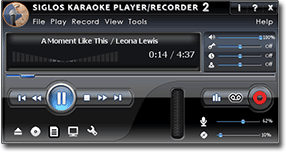
Program window
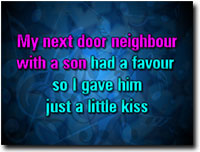
Enhanced CD+G
If you are a KJ and looking for the program for your PC to run a karaoke show from your laptop, then take a look at Siglos Karaoke Professional - a KJ-dedicated show manager.
Siglos Karaoke Player/Recorder 2 is an easy-to-use karaoke player for playing and recording songs on Windows-based computers.
- Play karaoke songs
- Our karaoke software allows you to play:
- CD+G karaoke discs (from your PC's CD player)
- MP3+G
- Zipped MP3+G
- BIN
- MIDI karaoke
- KMA files
- MCG files
- Any multimedia files supported by Windows (including AVI, MP4 and MPEG!)
- Videos from YouTube
- Automatically enhance CD+G graphics
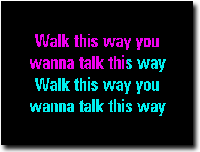
This is the original CD+G
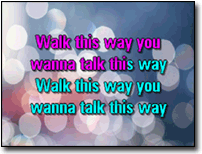
This is how it looks in Siglos 2
- Play in the full screen mode
- Use dual monitors to play karaoke songs on a TV screen while connected to your laptop
- Use background images and animations
- Use videos and live camera as background
- Play MIDI karaoke files with international characters (e.g. Chinese)
- Use built-in search to find and use karaoke tracks from the web

MIDI playback
- Our karaoke software allows you to play:
- Record as you sing
- Record your voice
- Adjust the recording level
- Listen to yourself singing (if you dare!)
- Use the included Audio Processor to add reverb and mix your singing with the music
- Use key changer to alter karaoke music to perfectly fit your voice
- Change the pitch from -12 to +12 semitone (half note steps) range
- Neither music instruments nor vocals will have any chipmunk or time alterations - this technology really works
- Change the tempo/speed of the song - from half speed to twice as fast as the original
- Use playlists to conveniently manage your files
- Play karaoke songs directly from YouTube
- Use search to look up karaoke videos on YouTube
- Create playlists containing online videos
- Download videos and use them later
- Use Multiplex control to turn vocal on and off on multiplex CD+Gs
- Change karaoke player appearance using skins
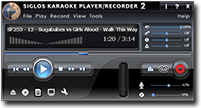
'Black' skin
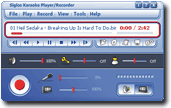
'Iconic' skin
System requirements
We recommend Windows 11 or Windows 10 to run our software. It also works on Windows 8 and Windows 7. Needs at least 3 GB free RAM. It will not work on Mac.
To play CD+G discs your CD/DVD drive has to be able to extract CD+G subcodes. Most of modern drives are capable of this, but we cannot guarantee it will work on all devices. Use the software evaluation version to see if your drive works fine before you purchase our karaoke player and recorder program.
Click here to view a full online manual for Siglos Karaoke Player/Recorder 2 in a new window
Siglos Karaoke Player/Recorder 2 costs $59 USD.
If you own any other our karaoke software, you get $10 discount on your purchase.
With the purchase you get a year of free updates and support.