Karaoke Sound Tools 3
Remove vocals from a song, adjust key and tempo
Remove vocals and voice from any song using powerful vocal remover, adjust key and tempo. Merge or clip karaoke songs.

Karaoke Sound Tools 3 allows you to:
- Remove vocals from any song
- Change key of a song to better suit your voice
- Change tempo of a song to make it easier to sing
- Process MP3, WAV, BIN, and MP3G (MP3 and CDG) file formats
- Combine multiple tracks to create a karaoke song medley
- Clip karaoke tracks to remove dead air
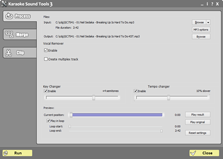
Karaoke Sound Tools 3 window
Karaoke Sound Tools 3 is an easy-to-use powerful vocal and voice remover program, music key and tempo changer for audio processing. It contains of three modules:
Process
Process
- Vocal remover to remove vocal parts from regular songs
- powerful new technology available in version 3!
- remove vocal from any recording
- create multiplex tracks (with vocal in the left and instrumental part in the right channel)
- Music key changer to adjust a song to singer's voice
- change the pitch in the -12 to +12 semitone (half-note steps) range
- after processing, music instruments have no chipmunk or time speed up or down, holding the key tempo the same as if the original studio recorded in your key
- you can process karaoke songs with lyrics (BIN and MP3G)
- Tempo changer to speed up or slow down a song
- change tempo of a song from two times slower to twice as fast
- our tempo changer tool retains the original key of a song
- you can process karaoke tracks with lyrics - they will be adjusted to stay in sync
All these karaoke sound tools can be fine-tuned in real-time, and work with MP3, WAV, BIN, and CDG files.
If you use a karaoke BIN or MP3G file and use our tempo changer, the graphics part of a song will be adjusted so the lyrics are in sync with the slower or faster version of a song.
No other software has this feature!
Advanced preview allows to:
- listen to the processing result in real-time
- control the playback position
- play selected part of a track in loop for fine-tuning
Merge
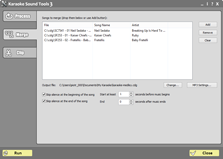
Merge
Merge allows to combine several karaoke songs into one medley.
- combine any number of MP3+G, ZIP, or BIN files
- remove silence (dead air) between tracks
Clip
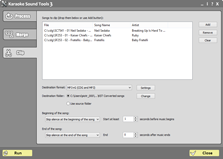
Clip
Clip allows to remove starting and ending part of recording.
- process any number of MP3+G, ZIP, or BIN files at once
- remove silence (dead air) at the beginning or at the end of a song
- remove the beginning of a track and start at the exact moment (this can be used to remove logos or images from songs)
This karaoke software contains tools that other companies are selling separately at extremely high prices, and yet they cannot match the quality and ease-of-use of Karaoke Sound Tools 3.
Do not take our word for it. Download the evaluation version now and listen to results yourself.
System requirements
We recommend Windows 11 or Windows 10 to run our software. It also works on Windows 8. It does not run on Windows 7. Needs at least 3 GB free RAM. It will not work on Mac.
Click here to view a full online manual for Karaoke Sound Tools 3 in a new window
Karaoke Sound Tools 3 cost $59 USD.
If you own any other our software, you get a $10 discount on your purchase.