Power CD+G Burner 2
Best Karaoke Software to Burn, Rip, and Copy CD+G Discs
Burn, rip, and copy CD+G karaoke discs on Windows
Power CD+G Burner 2 gives each disc task its own workflow: create a custom CD+G disc from karaoke files, save tracks from a physical disc to your computer, or copy an existing disc.
CD+G reading and writing depend on the optical drive as well as the software. Use the free trial with the exact drive and media you plan to use before purchase.

Choose your CD+G task
Burn karaoke files to a CD+G disc
Start with: BIN; a CDG graphics file paired with a same-name MP3 or WAV audio file; a ZIP containing an MP3+CDG pair; or supported KMA/MCG files.
In the program: open Burn, add or drag in the files, arrange tracks with Move Up/Move Down, select the burner, insert a blank CD-R, confirm enough temporary image space, and select Burn.
Result: the program creates a disc image and then writes a physical CD+G disc.
Read the concise burning guide or follow the complete Burn tutorial.
Rip a CD+G disc to karaoke files
Start with: a physical CD+G disc and an optical drive that can read its CD+G data.
In the program: open Rip, select the reader and output folder, choose BIN, CDG+MP3, CDG+WAV, or ZIP, insert the disc, select Refresh, choose the tracks, and select Rip.
Result: the selected tracks are saved to the hard drive in the chosen format. If online disc metadata is available, review the generated track names because not every disc is listed.
Read the concise ripping guide or follow the complete Rip tutorial.
Copy a physical CD+G disc
Start with: the source CD+G disc, a compatible reader and burner, and a blank CD-R. The same drive can be used for reading and writing.
In the program: open Copy, select the reader and burner, insert the source disc, select Refresh, confirm enough temporary image space, and select Copy. With one drive, replace the source with the blank disc when prompted.
Result: the program reads the source, creates an image, and burns the destination disc. Copy only material you own or have permission to copy.
Read the CD+G copying guide or follow the complete Copy tutorial.
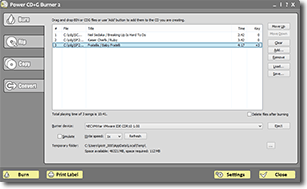
Burn tab with karaoke files arranged for a CD+G disc
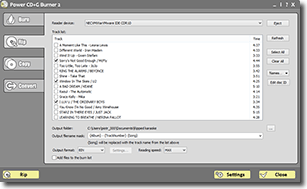
Rip tab with CD+G output format and track options
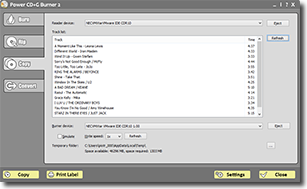
Copy tab with reader, burner, and temporary image settings
Features and compatibility
- Burn BIN, CDG with matching MP3 or WAV audio, MP3+G ZIP, KMA, and MCG karaoke files to standard CD-R media.
- Arrange a custom track order, change a song's key before burning, and normalize audio levels across a compilation.
- Rip compatible CD+G discs as BIN, CDG+MP3, CDG+WAV, or ZIP files for supported computer karaoke players.
- Copy a disc through a documented read, temporary-image, and write process using one or two compatible drives.
- Use optional online lookup for disc and track metadata when a listing is available; check names before saving a large library.
- Print CD case labels and song lists, and convert supported MP3+G, ZIP, BIN, KMA, and MCG collections.
Drive requirement: the manual specifies an MMC-compatible drive with DAO/96 support. Drive, blank-media, and standalone-player compatibility vary, so test the complete workflow with the free trial.
Requirements and detailed help
System requirements
Our software runs on Windows 11 and Windows 10. Needs at least 3 GB free RAM. We recommend systems with 16GB of total RAM memory. It will not work on Mac.
CD+G Burning Software FAQ
What can Power CD+G Burner 2 do?
Power CD+G Burner 2 provides separate workflows for burning karaoke files to a CD+G disc, ripping tracks from a compatible physical disc, and copying a disc. It also includes supported-format conversion, key changing, normalization, and label printing.
Can Power CD+G Burner rip karaoke discs to MP3+G or ZIP files?
Yes. You can save CD+G tracks from compatible discs to MP3+G, ZIP, BIN, or CDG plus WAV formats, then play them with karaoke player software such as Siglos Karaoke Player/Recorder 2.
Can I copy an existing karaoke CD+G disc?
Yes. Power CD+G Burner 2 can create backup or working copies of CD+G discs when the reader and burner support the required CD+G modes. The process reads the source to a temporary image and then writes a blank CD-R.
What drive and blank media do I need?
The software runs on Windows 10 and Windows 11. CD+G writing requires an MMC-compatible optical drive with DAO/96 support and a blank CD-R. It does not create DVD-video karaoke or burn CD+G to DVD media. Use the free trial to verify your exact drive, media, and playback device.
Related karaoke burning and conversion guides
Power CD+G Burner 2 costs $49 USD.
Current owners of other Power Karaoke programs can get Power CD+G Burner at $10 discount.