Siglos Karaoke Professional
The ultimate KJ software
The ultimate KJ software to get control over your karaoke show! Siglos Karaoke Professional makes your shows better & easier to run.

Siglos Professional is a karaoke software that helps running your show:
- Run your karaoke on your PC. No more carrying hundreds of disks, risking damage and loss.
- Two-screen display makes running your karaoke show easier and more fun.
- Advanced display functionality make lyrics look better.
- Find any song in literally fraction of second with the powerful song database.
- Singer rotation management automatically keeps singers queue in order. You can even add new songs while singers are performing.
- Customers have Remote access to song list and reqests from their phones (no app required)
- Singer announcement releases you from 'Who's next' questions, and a time guide will answer 'When is it my turn?' questions, quickly and accurately.
- Singer history - no more typing the same songs for regulars.
- Track silence detector removes unwanted silences from the start and end of a karaoke song.
- Instrumental detector allows to skip intrumental solos during karaoke performance.
- Key Changer changes the key of a song when adding a request or even when the singer is already singing.
- Tempo Changer slows down or speeds up the song.
- Enable kiosk mode and use phone, tablet or laptop as a songbook
- Use built-in internet server to allow access from any mobile phone connected to the internet
- Busy with other things? Have your KJ show run in automatic mode while you're unable to operate the computer.
- Play CD+G disks: if a singer brings their own CD+G disk, just place it in the queue and insert when prompted - the karaoke show continues uninterrupted.
- No need to start another karaoke player when nobody is singing. Your fill-in playlist activates automatically when the song stops, then fades away when it's time for the next performance.
- Preview window allows you to see precisely what the singer sees.
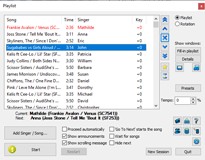
- Playlist view checks the actual songs in the queue, instead of seeing the rotation order.
- NewSupport for PartyTyme catalog subscription gives you immediate online access to over 20,000 songs
- Play karaoke songs directly from YouTube.
- Use search to look up karaoke videos on YouTube
- Create rotation containing online videos
- NewCreate the list of songs in PDF format to print or put on your website for customers to download.
- Export songs from the database and use them in the songbook tool, or use a spreadsheet program and create the books yourself.
- Use rotation presets to preload rotations for regular singers.
- The best all-round professional karaoke software!
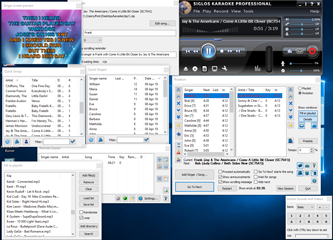
Computer running Siglos Karaoke Professional
Siglos Karaoke Professional feature list:
-
Highly advanced karaoke player:
Uses a high-quality professional karaoke player engine that allows images, videos, or any live camera source to be used as backgrounds.
Predefined set of animated backgrounds will make your show stand out.
Enhanced CD+G display
-
Support for multiple formats:
Siglos Karaoke Professional handles MP3G, ZIP, BIN, MIDI Karaoke (MID and KAR), KMA, and MCG.
Also fully supports AVI and MPEG video formats.
To convert CD+G disks from your collection into digital file formats you need to use Power CD+G Burner -
External screen support:
If your computer supports multiple displays (most laptops do), the main program window is displayed on your laptop while the karaoke lyrics are on the external screen.
- Song database:
Our software uses a powerful built-in database that can scan your hard disk, find and index karaoke songs, then provide you with an easy-to-use search interface to find songs in seconds.
It scans the selected folder and subfolders for karaoke files. Applies file match rules and also reads ID3 tags of MP3 files.
Our KJ software also allows the user to search a song database using multiple field matching - a feature not found in many karaoke programs. Use global filters that match text in the artist name, song title, and disk ID, or search each of the fields separately (including file formats). Each of the search fields has multi-matching capability, meaning that you may enter several match phrases. For example, entering ma he in the Title displays all songs containing 'ma' and 'he' strings in their titles (so the list of results may include Made In Heaven, Hell's Maid, and Mayhem.) As you can see the searches are not case-dependent, and the order of match does not matter.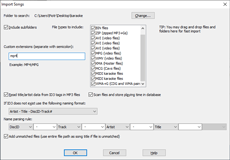
Import Songs dialog box
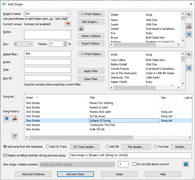
Add Singer dialog box
- Singer rotation management:
Keeping everyone happy becomes a lot easier with professional karaoke software, as it makes sure that one person does not dominate the event. Our professional karaoke software places a singer in the queue, and first plays one song for each singer before allowing a second round. The order of singers is displayed in the list at the left of the rotation window. Everything is fair, and all the singers know how long they'll have to wait.
In the rotation mode the window displays two lists, with the singers on the left and their songs at the right. Clicking on a singer displays all of their selected songs. And a number in brackets displays the number of songs for each singer.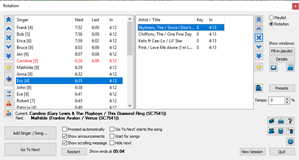
Rotation window
-
Singer announcements:
When a singer is about to sing, our software displays an automatic introduction screen with the name of a singer and his/her chosen song.
It is also possible to define a custom singer introduction screen for regular singers.It also displays a customizable scrolling reminder with the name of the next singer during each performance and a counter that displays time left to the end of the song.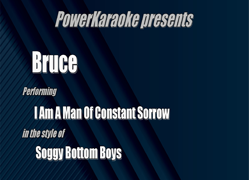
Singer announcement

Playback with scrolling reminder
-
Song silence detector:
Many karaoke songs have silence at the beginning and at the end, but our KJ tool automatically skips this so you can play more songs and avoid uncomfortable and unprofessional silences.
-
Instrumental skip:
We all love guitar solos. But sometimes two minutes of instrumental music may be just too much. Siglos will detect instrumental parts in CD+G songs and can skip them during performance.
-
Singer history:
Siglos keeps the singer names and their songs in the database. So when regulars come to your karaoke shows, you can retrieve their requests is a matter of seconds.
Add Singer dialog box
If you have added singers in the past, the list next to a Singer's name will contain the songs they sang. To quickly select the singer, simply double-click their name. Selecting a singer from the history will fill a song list with the list of their songs from the past. Song and history lists can be expanded and searched, using the search buttons next to them.
All lists are sortable - to sort the list by the column, click the header.
-
Key and tempo changer:
A subtle but effective key changer allows you to adjust the pitch of a song to better suit the singer, and you can also slow down or speed up the music as required. Better still, our professional program remembers which singer uses which key and tempo modifications.
-
Fill-in Playlist:
Songs placed in the fill-in playlist are automatically played when nobody is singing. You no longer have to switch to a CD player or play MP3s using other software; Siglos Karaoke Professional will do this automatically, fading the music in and out as necessary.
-
Preview window:
If the singers' screen is placed in a position that you cannot see it, software uses a preview window to monitor the lyrics and see what they see.
-
Venue manager:
Siglos allows to tag the singers by the venue name. If you are running shows in various places it allows you to filter singers and songs, making finding what you're looking for quick and easy.
-
Automatic mode:
If you have to leave the show for a few minutes, Siglos Karaoke Professional allows you to run the show on autopilot. It will display the singer announcement for a predefined amount of time, and then will start the next song.
-
Time information:
A rotation list displays when the singer will sing next. This information is updated in real-time.
-
Playlist view:
If you need more information than is shown in the rotation view, you can switch to the playlist view at any time.
Playlist view
-
Promo message:
You may add your promotional message to the scrolling reminder - it may be used to promote your next karaoke show, or display any other information that you choose.
-
CD+G disk playback:
If a singer asks you to play a song from his CD+G disk, simply select add CD+G disk track, choose the number of a track, and you will be prompted to insert the disk at the appropriate time.
Siglos Karaoke Professional software does not copy songs from customer's disks to the hard disk, as this is illegal. -
Create PDF with the list of songs:
If you want to create a printout of your songs or would like to post the list it on your website for customers to download, Siglos Karaoke Professional allows you to create a PDF file with the list of songs. You may choose various formatting options and choose which songs should be included (for example you may exclude songs that require online access, like YouTube or PartyTyme)
-
Export of a song list:
Songs may be exported from the program's database to a CSV or XML file.
You may then use dedicated songbook software, or a spreadsheet program to create the songbook yourself. -
Kiosk mode:
You can enable a server that runs in a local network and allows you to use any connected device as a client to browse songs and make requests.

Kiosk mode
-
Client devices:
Customers can use their own phones to browse songs and make requests.

Remote song list
Use built-in internet server to allow access from any mobile phone connected to the internet
- Siglos Karaoke Professional runs on your laptop
- Your customers connect to ConnectKaraoke.com by entering your show name or using direct link provided by you
- Any device connected to the internet can be used to browse song list and to make requests
Visit ConnectKaraoke.com to view video tutorials on using this feature.
License
Our professional KJ karaoke program comes with a per-user license. It does not use activation or require an internet connection. If you own two computers you can install it on both, providing you are the only user of the program.
System requirements
We recommend Windows 11 or Windows 10 to run our software. It also works on Windows 8 and Windows 7. Needs at least 3 GB free RAM. It will not work on Mac.
To play CD+G disks your drive needs to be able to read CD+G subcodes - most of them do, but please download the evaluation version to make sure.
Click here to view a full online manual for Siglos Karaoke Professional in a new window
Siglos Karaoke Professional costs $119 USD.
If you own Siglos Karaoke Player/Recorder, you may purchase Siglos Karaoke Professional at $50.
If you own any other our software, you'll get $10 discount on your purchase.