Karaoke Articles
How to Make a Karaoke Video: Step-by-Step Guide
How to Make a Karaoke Video from a SongKaraoke videos turn a song into a complete sing-along file with backing music, synchronized lyrics, and visuals that are easy to follow on a screen. They are useful for home karaoke, YouTube channels, singing lessons, parties, and KJ libraries because they play like normal video files while still giving singers clear lyric timing. Older karaoke video workflows often focused on AVI, MPEG, and manual lyric timing. A current workflow is simpler: start with an audio file or an existing karaoke track, use AI or conversion tools where appropriate, style the lyrics for readability, and export an MP4 video that works on modern computers, TVs, and online platforms. In short: load an MP3 or WAV song, create or clean the backing track, add accurate lyrics, synchronize them to the vocal, review the timing, and export an MP4. The walkthrough below shows each stage with the actual Windows software screens. Fastest route: start with an MP3 or WAV file, let AI Karaoke Video Creator prepare the vocal-reduced soundtrack and initial lyric timing, then review the full song and export MP4. See the worked example and finished 4K sample. Already have CD+G or MP3+G? Skip lyric creation and use Ultimate CD+G to Video Converter to create a video from the existing karaoke track. Try the karaoke video maker for Windows Open the official AI Karaoke Video Creator tutorial What Makes a Good Karaoke VideoA karaoke video is only useful if singers can read it comfortably and trust the timing. High-resolution output is helpful, but readability matters more than decorative effects. The lyrics should contrast with the background, the highlight should stay in sync with the music, and the video should be easy to play without special software.
Recommended PowerKaraoke ToolsAI Karaoke Video Creator is the main PowerKaraoke tool for creating new karaoke videos from regular songs. It can remove or reduce lead vocals, synchronize lyrics, apply visual styles, preview the result, and export finished video files. It is a strong fit for home users, content creators, vocal coaches, and KJs who need custom tracks. If you already have CD+G, MP3+G, or ZIP karaoke songs and want to turn them into videos, use Ultimate CD+G to Video Converter. That workflow preserves the existing karaoke lyric graphics and focuses on producing a video file for playback on modern devices. For classic CD+G authoring rather than video output, use AI Karaoke CD+G Creator or AI Karaoke CD+G Creator Pro. For playback and recording after the song is created, Siglos Karaoke Player/Recorder 2 is the practical home player. How to Make a Karaoke Video Step by Step1. Choose the source audioStart with the cleanest source you can legally use: an instrumental track, an MP3 or WAV song, or an existing CD+G/MP3+G karaoke track. An instrumental needs no vocal removal. A regular commercial mix may work with AI vocal reduction, but the result depends on how the original recording was mixed. 2. Prepare the backing trackIf the source contains a lead singer, use AI vocal removal and listen to the entire result before timing lyrics. Check choruses, quiet introductions, stereo effects, and sections with backing vocals. Keeping useful backing vocals can make the finished track sound more natural, while excessive processing may introduce audible artifacts. 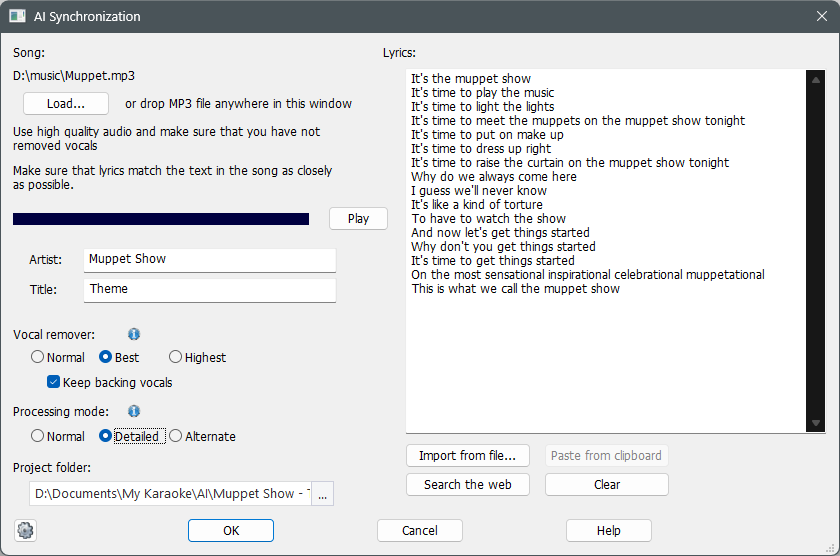
3. Add and clean the lyricsImport or enter the complete lyrics, using only material you have permission to use. Correct spelling before synchronization, identify repeated choruses, and divide long sentences into lines that can be read comfortably on a TV. Good line breaks are as important as font size because singers need to see the next phrase before it begins. 4. Synchronize lyrics with the musicAutomatic lyric synchronization provides a useful first pass. Then listen from the beginning and correct lines or individual words that highlight too early or too late. Pay special attention to pickups before the beat, held notes, fast passages, and instrumental breaks. Accurate timing is the difference between a decorative lyrics video and a usable karaoke track. 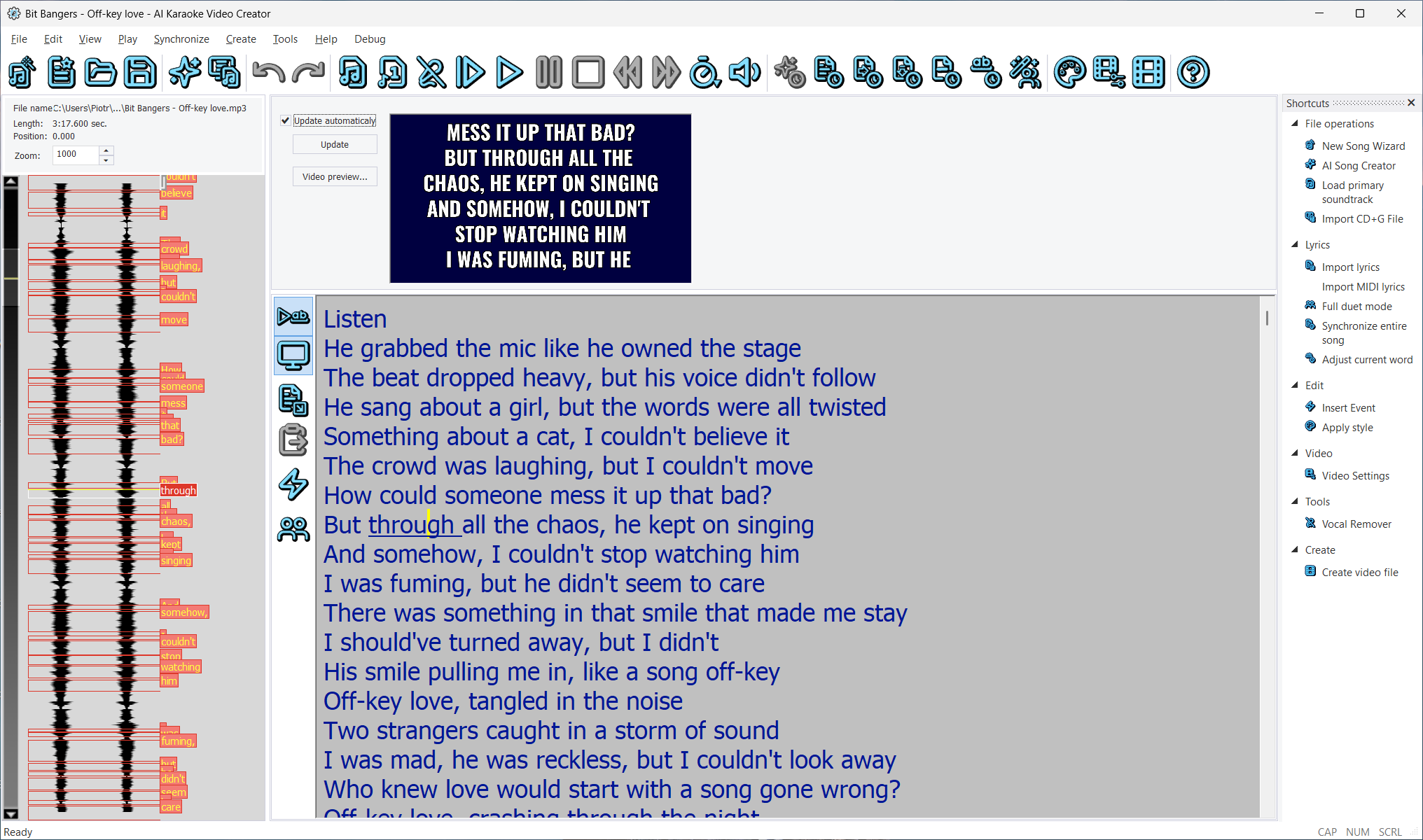
5. Design a readable karaoke screenUse a large font, strong contrast, and consistent colors for upcoming and currently sung words. Add a background image, video, or slideshow only when it leaves the lyrics easy to read. Include a short title screen, an intro countdown when helpful, and credits that do not delay the performance unnecessarily. 6. Review the complete songWatch the project from beginning to end before exporting. Check lyric spelling, timing, line breaks, title information, background changes, and the final audio balance. If the video is intended for a party or public show, test it from the back of the room: text that looks large on a laptop can be difficult to read on a distant TV or projector. 7. Export and test the MP4 videoMP4 is the practical default for Windows computers, TVs, media players, projectors, and online platforms. Choose the resolution for the final display, export the video, and play the finished file outside the editor. Keep the project and source files so you can correct a lyric or create another resolution later. 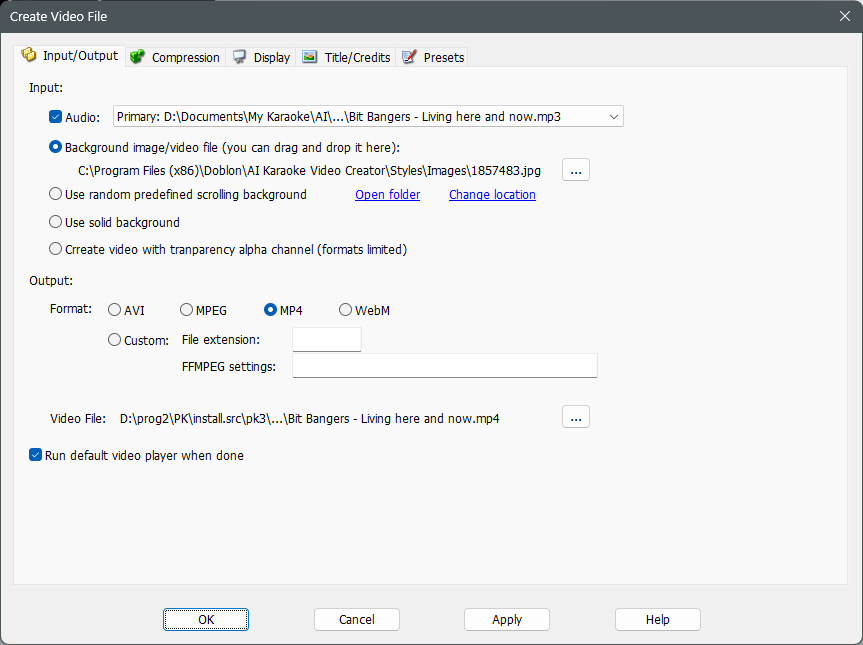
Karaoke Video Quality Checklist
Karaoke Videos vs. CD+G TracksKaraoke videos are best when you want HD visuals, MP4 playback, YouTube upload, or easy use on a TV. CD+G tracks are better when you need compatibility with traditional karaoke disc players, older KJ libraries, or hosting systems built around CD+G files. Both formats can be useful, but they solve different playback problems. If you are building a new library for modern devices, video is usually more flexible. If your collection is already CD+G-based, converting selected songs to video may be enough. You do not have to abandon the original karaoke files; keep them as source material and export video versions only when they are useful. Common Mistakes to AvoidDo not rely on normal music players for karaoke video creation; they cannot remove vocals, synchronize lyrics, or style the display. Do not use tiny lyric fonts just because they fit more words on screen. Do not export only one resolution if you plan to use the same song on both portable devices and large TVs. Also avoid overloading the video with busy animations behind the lyrics. A karaoke video is a performance aid first. The best background is often the one that lets the singer focus on the words, the rhythm, and the next phrase. Frequently Asked QuestionsWhat is a karaoke video?A karaoke video combines a backing track, synchronized lyrics, and visual backgrounds into a video file that singers can follow on a screen. Can I make karaoke videos from regular songs?Yes. AI Karaoke Video Creator can remove or reduce lead vocals, synchronize lyrics, and export a finished karaoke video from common audio files. What video format should I use for karaoke videos?MP4 is usually the best format because it works on Windows computers, TVs, media players, and online video platforms. Can I convert CD+G karaoke songs to video?Yes. Use Ultimate CD+G to Video Converter when you already have CD+G, MP3+G, or ZIP karaoke tracks and want video output. Is there a free way to make a karaoke video?You can test the complete workflow with the free AI Karaoke Video Creator trial. Trial exports contain a watermark, vocal removal is limited for evaluation, project files cannot be saved, and evaluation reminders may appear. It is designed to let you test the workflow with your own audio before purchasing. Can I use a YouTube video to make karaoke?Start with an MP3 or WAV file that you own or have permission to use. AI Karaoke Video Creator works with local audio files rather than importing a YouTube URL directly. If a recording is copyrighted, obtain the appropriate rights before downloading, modifying, publishing, or performing it. Can I make a karaoke video in CapCut?A general video editor such as CapCut can assemble audio, text, and backgrounds, but you still need to prepare the backing track and time the lyrics. Dedicated karaoke software combines vocal reduction, automatic lyric synchronization, timing correction, karaoke-specific styling, and video export in one workflow. How can I record myself singing karaoke?Create and export the karaoke video first, then play it in Siglos Karaoke Player/Recorder 2 with a microphone connected. The player can record your performance while displaying the synchronized lyrics. Related Articles |